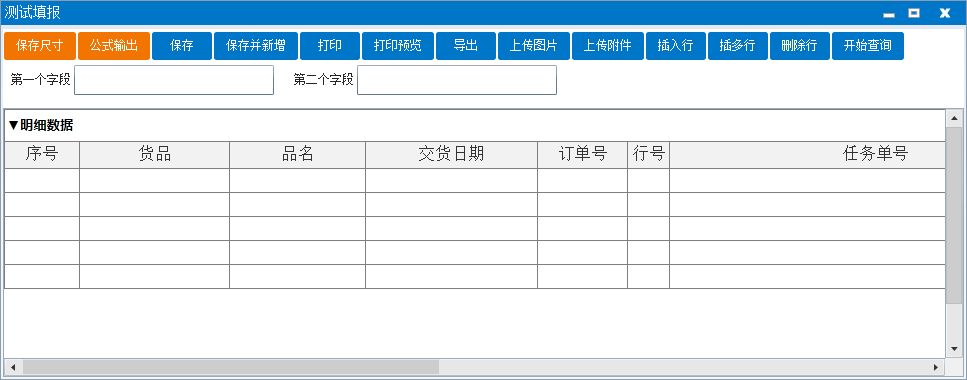
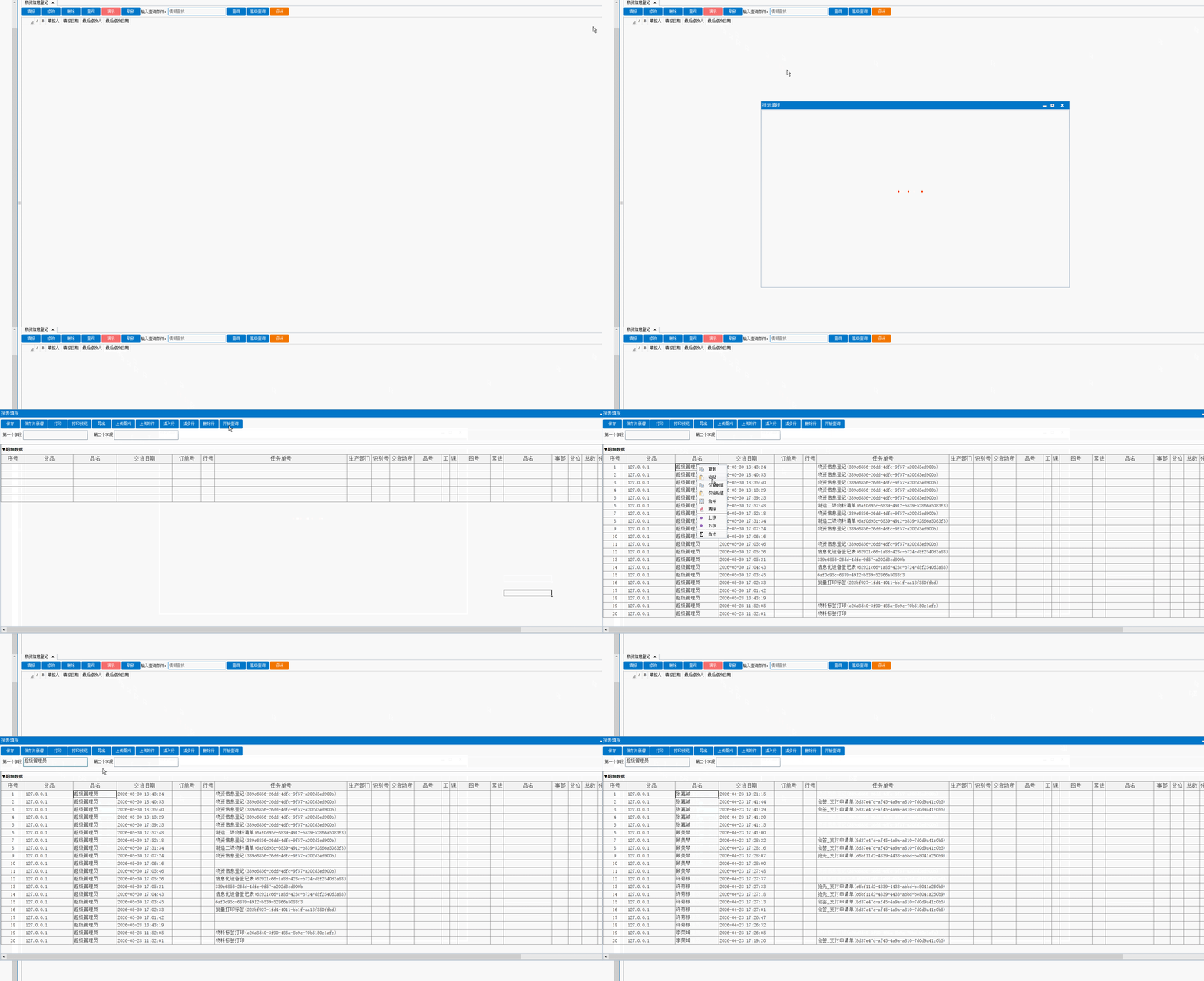
- Imports SpreadsheetGear
- Imports C1.Silverlight
- Imports C1.Silverlight.C1MessageBoxButton
- Imports C1.Silverlight.C1MessageBoxIcon
- Imports Newtonsoft.Json
- Imports Newtonsoft.Json.Linq
- Imports Microsoft.VisualBasic
- Imports System.IO
- Imports System.Text
- Imports System.Net
- Imports System.Windows.forms
- Imports System.Threading.Tasks
- Namespace ExcelViewVBDotnet
- Public Class StandardInterface
- '预留位置1
- '预留位置2
- Dim EV As SpreadsheetGear.Windows.Controls.WorkbookView,AW As SpreadsheetGear.IWorkbook,Range As SpreadsheetGear.IRange
- Dim CF,TS,VW As Object
- Public Sub Workbook_Open(OldRoot As Object,NewRoot As Object,Excel As SpreadsheetGear.Windows.Controls.WorkbookView)
- EV = Excel
- Excel.GetLock()
- AW = Excel.ActiveWorkbook
- Range = AW.ActiveWorksheet.Range
- Excel.ReleaseLock()
-
- '绑定工具条触发,不能测试运行
- CF = OldRoot.Children(1)
- '绑定显示区域,不能测试运行
- VW = OldRoot.Children(3)
- '绑定工具条区域,不能测试运行
- TS = OldRoot.Children(5)
- '调整表格界面(上边距留40像素给控件区域,下边距留10像素)
- VW.Margin = New Thickness(0, 45, 0, 0)
-
- '实例化容器和输入控件
- Dim SP As New StackPanel
- Dim Lbl_Field1 As New System.Windows.Controls.TextBlock
- Dim TB_Field1 As New System.Windows.Controls.TextBox
- Dim Lbl_Field2 As New System.Windows.Controls.TextBlock
- Dim TB_Field2 As New System.Windows.Controls.TextBox
-
- '容器设置
- SP.Margin = New Thickness(0, 0, 0, 0)
- SP.VerticalAlignment = System.Windows.VerticalAlignment.Top
- SP.Orientation = System.Windows.Controls.Orientation.Horizontal
- Grid.SetRow(SP, 1)
- Grid.SetRowSpan(SP, 50) '大幅扩展背景区域高度
- Grid.SetColumnSpan(SP, 3)
-
- '========== 第一个字段标签 + 输入框 ==========
- Lbl_Field1.Text = "第一个字段"
- Lbl_Field1.Foreground = Application.Current.Resources("Foreground2")
- Lbl_Field1.VerticalAlignment = System.Windows.VerticalAlignment.Center
- Lbl_Field1.Margin = New Thickness(8, 0, 3, 0)
-
- TB_Field1.Width = 200
- TB_Field1.Height = 30
- TB_Field1.FontSize = 14
- TB_Field1.VerticalContentAlignment = System.Windows.VerticalAlignment.Center
- TB_Field1.Margin = New Thickness(0, 2, 12, 2)
- TB_Field1.Foreground = Application.Current.Resources("Foreground2")
- '失去焦点时写入F_66233单元格
- AddHandler TB_Field1.LostFocus, Sub(s, e)
- If Not String.IsNullOrEmpty(TB_Field1.Text) Then
- aw.WorkbookSet.GetLock()
- Range("F_66233").Value = TB_Field1.Text
- aw.WorkbookSet.ReleaseLock()
- End If
- End Sub
-
- '========== 第二个字段标签 + 输入框 ==========
- Lbl_Field2.Text = "第二个字段"
- Lbl_Field2.Foreground = Application.Current.Resources("Foreground2")
- Lbl_Field2.VerticalAlignment = System.Windows.VerticalAlignment.Center
- Lbl_Field2.Margin = New Thickness(8, 0, 3, 0)
-
- TB_Field2.Width = 200
- TB_Field2.Height = 30
- TB_Field1.FontSize = 14
- TB_Field1.VerticalContentAlignment = System.Windows.VerticalAlignment.Center
- TB_Field2.Margin = New Thickness(0, 2, 12, 2)
- TB_Field2.Foreground = Application.Current.Resources("Foreground2")
- '失去焦点时写入F_66234单元格
- AddHandler TB_Field2.LostFocus, Sub(s, e)
- If Not String.IsNullOrEmpty(TB_Field2.Text) Then
- aw.WorkbookSet.GetLock()
- Range("F_66234").Value = TB_Field2.Text
- aw.WorkbookSet.ReleaseLock()
- End If
- End Sub
-
- '向容器添加所有控件
- SP.Children.Add(Lbl_Field1)
- SP.Children.Add(TB_Field1)
- SP.Children.Add(Lbl_Field2)
- SP.Children.Add(TB_Field2)
-
- '向界面添加容器
- OldRoot.Children.Add(SP)
-
- '添加工具条按钮
- Dim BT1 As New Button
- BT1.Name = "BT_TQ"
- BT1.Content = "开始查询"
- BT1.Margin = New Thickness(0, 2, 0, 2)
- BT1.Padding = New Thickness(13, 3, 13, 3)
- BT1.Style = Application.Current.Resources("ButtonStyle")
- BT1.Foreground = Application.Current.Resources("Foreground1")
- AddHandler BT1.Click, Sub()
- 'KBFormula(1,"提取公式名称")或KBFormula(2,"传递公式名称")或KBFormula(3,"列表公式名称")
- App.KBFormula(1,"提取明细")
- End Sub
- TS.Children.Insert(16, BT1)
- '位置:2保存3新增4提交5退回6打印7预览8导出9捕获10上传图片11上传附件12插入行13插多行14删除行15查找16最后
- End Sub'打开时执行事件
-
- Public Sub RangeSelection(sender As Object,e As SpreadsheetGear.Windows.Controls.RangeSelectionChangedEventArgs)
- End Sub'单元格选择后执行的事件
- Public Sub RangeChanged(sender As Object,e As SpreadsheetGear.Windows.Controls.RangeChangedEventArgs)
- End Sub'单元格编辑完成后执行事件
- Public Sub ButtunClick(sender As Object,e As SpreadsheetGear.Windows.Controls.ShapeActionEventArgs)
- End Sub'按钮/标签点击事件
- Public Sub FollowHyperlink(sender As Object)
- End Sub '暂不支持
- End Class
- ' 注:除事件字眼下可以自定义代码外的所有代码不允许改动,否则编译将有可能失败。
- End Namespace
|
|





 QQ好友和群
 QQ空间
QQ空间




快表帝国客服01